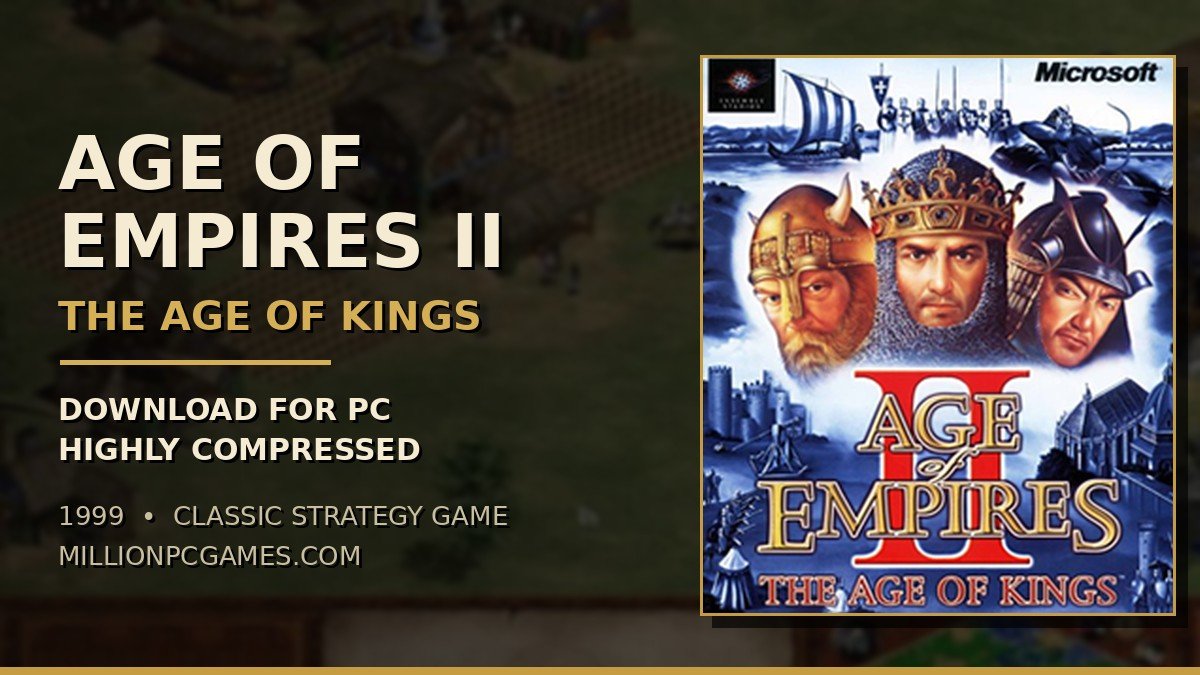

Some games fade away after a few years. Age of Empires 2 is not one of them. More than twenty-five years after it first came out, people are still searching for the Age of Empires 2 download for PC, still installing it on laptops that were not even built when the game was released, and still losing whole evenings to one more match.
If that is what brought you here, you are in the right place. This is the full guide to the 1999 classic — what the game is, why it still has one of the biggest strategy communities on PC, how big the download is, what kind of PC it needs, how to get it running on Windows 10 and 11, and the fixes for the problems people actually run into. No fluff, just the stuff that matters before you install it.
Age of Empires 2 — Game Information
| Game Name | Age of Empires II: The Age of Kings |
| Release Date | September 1999 (PC, North America) |
| Developer | Ensemble Studios |
| Publisher | Microsoft |
| Designer | Bruce Shelley |
| Genre | Real-Time Strategy (RTS) |
| Game Engine | Genie Engine |
| Mode | Single Player, Multiplayer (up to 8 players) |
| Platform | PC (Windows), Mac, PlayStation 2 |
| Main Campaign Length | Around 20–30 hours (all five campaigns) |
| File Size | About 2 GB (original with expansion); Definitive Edition about 15–30 GB |

What Is Age of Empires 2?
Age of Empires II: The Age of Kings is a 1999 real-time strategy game from Ensemble Studios, and it is the game that made the whole genre click for millions of people who had never played a strategy game before. The first Age of Empires (1997) covered the ancient world; the sequel moved forward a thousand years into the Middle Ages — knights, castles, monks, trebuchets, and longbowmen — and that setting turned out to be exactly what the formula needed.
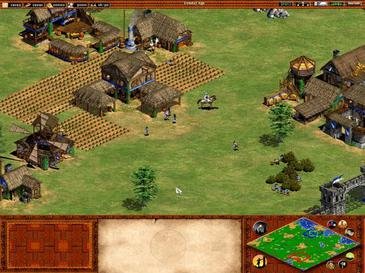
The idea is simple to explain and hard to master. You start with a town centre, three villagers, and a scout on horseback, and almost nothing else. From there you gather food, wood, gold, and stone, build up a town, train an army, and advance through four ages — Dark, Feudal, Castle, and Imperial — until your little village becomes a walled city with castles and siege weapons. A match can be over in twenty minutes or last two hours, and the difference is almost always the decisions you made in the first five minutes.
It worked because the game respects your time and your intelligence at the same time. There is no long tutorial holding your hand, but the William Wallace campaign teaches you the basics while telling a real story. The economy is easy to understand — four resources, and every unit and building costs some mix of them — but balancing them under pressure is a skill people spend years refining, which is why the game is still played competitively in 2026, with ranked ladders and tournaments with real prize money.
The Setting — The Middle Ages, From the Fall of Rome to the Renaissance
Age of Empires 2 is set in the Middle Ages, roughly from the fall of Rome to the dawn of the Renaissance, and history is not just decoration here — it is the whole point. Every civilization is a real medieval people and every campaign follows a real historical figure.
That was a deliberate choice by the team at Ensemble Studios. The designer, Bruce Shelley, had co-designed Sid Meier’s Civilization, and he believed a game is more interesting when the history behind it is real. So the Britons get longbowmen because English longbowmen were genuinely feared on medieval battlefields, the Mongols get fast cavalry archers because that is how the Mongols actually fought, and the Turks get gunpowder units early because the Ottoman Turks were among the first to use guns and cannons properly. None of it is perfectly accurate — it is a game, not a textbook — but the flavour is honest.
Gameplay — Build, Gather, Advance, Conquer
Every match follows the same arc, and learning that arc is learning the game. You start in the Dark Age with almost nothing, and everything you do is a trade-off between growing your economy now and building an army before your opponent does.
The Four Ages
The four ages are the backbone of the game. In the Dark Age you have a handful of villagers, and your only real job is to gather food and wood and survive. The Feudal Age opens up military buildings and your first real soldiers. The Castle Age brings castles, knights, monks, and siege weapons. The Imperial Age is the endgame — the most powerful units and the big fights that decide the match. Advancing costs resources and takes time, and the moment you click that button you are weaker for a minute or two, because you spent the resources on the age instead of on soldiers. Knowing when to advance is the first real skill the game teaches you.
Four Resources, One Economy
Everything runs on four resources: food, wood, gold, and stone. Villagers gather them — hunting and farming for food, chopping trees for wood, mining for gold and stone — and every unit, building, and technology costs some combination of the four. Food feeds your army and pays for age advances, wood builds almost everything, gold pays for soldiers and technologies, and stone builds castles, towers, and walls. The economy is the game: a new player will usually lose because their economy stopped, not because their army was smaller — villagers left standing still, farms that ran out, gold mines that were never found.
The Civilizations — Thirteen Ways to Play
Each civilization plays differently, and that is where the replay value comes from. The Britons have longer-range archers, the Franks have strong knights and cheaper castles, the Mongols have fast cavalry archers, the Goths can flood the map with cheap infantry, and the Celts chop wood faster. Every civilization also has one unique unit — the Briton Longbowman, the Mongol Mangudai, the Japanese Samurai, the Persian War Elephant — and a unique technology that only they can research.
Combat — Armies, Castles and Siege
Fighting in Age of Empires 2 is about counters, not just numbers. Archers beat infantry, cavalry beats archers, spearmen beat cavalry, and siege weapons beat buildings but die quickly to anything that reaches them. A smaller army with the right mix will beat a bigger army with the wrong one. Castles are the strongest defensive buildings in the game and the anchor of every late-game town, monks can convert enemy units to your side, and trebuchets can knock a castle down from a distance your enemy cannot answer.
Age of Empires 2 Game Features
The original 1999 release shipped with far more than most games manage today, and the Definitive Edition has added to it without breaking what made it work.
- Thirteen playable civilizations at launch, each with its own bonuses, unique unit, and unique technology.
- Five campaigns based on real history, covering William Wallace, Joan of Arc, Saladin, Genghis Khan, and Barbarossa.
- Four ages to advance through, from the Dark Age to the Imperial Age, each unlocking new buildings and units.
- More than 200 units and technologies across military, economic, and defensive categories.
- A map editor that lets you build your own scenarios, plus custom scenarios and campaigns made by the community.
- Multiplayer for up to eight players, over a network or on the internet, in modes like deathmatch, regicide, and king of the hill.
- Random maps, so no two matches ever play the same way, and dozens of different map types, from open plains to islands.
- Cheat codes for casual play, including the famous “how do you turn this on” cobra car, for when you just want to mess around.
The Campaigns — History You Can Play
The campaigns are where most people fall in love with the game. Each one is a series of scenarios that follow a real historical figure through their most famous battles, with short voice-acted introductions that set the scene.
William Wallace teaches you the basics — the first scenario is literally a tutorial in disguise, guiding you through moving villagers, gathering resources, and building your first army. Joan of Arc follows the Maid of Orléans from the siege of Orléans to her victories in France, and the scenarios get harder as her army grows. Saladin puts you on the other side of the Crusades, defending the Holy Land from the Crusader states. Genghis Khan is the biggest of the original campaigns, six scenarios of conquest across Asia, and Barbarossa follows the German emperor’s campaigns in Italy and the Holy Land.
What makes them work is that they are not just a string of battles. Each scenario has its own objective — survive a siege, escort a relic, destroy a wonder before the timer runs out — and the story moves forward between missions. The Definitive Edition added even more campaigns on top of these five, covering figures like El Cid, Suryavarman, and the African kingdoms, so there are dozens of hours of single-player content before you ever need to touch multiplayer.
The Civilizations — 13 in the Original, More Than 50 in the Definitive Edition
Picking a civilization is the first decision of every match, and it changes how the whole game feels. The original thirteen were the Britons, Franks, Goths, Teutons, Japanese, Chinese, Byzantines, Persians, Saracens, Turks, Vikings, Mongols, and Celts. Each one gets a unique unit and a set of bonuses that push you toward a certain style: the Britons toward archers, the Franks toward cavalry, the Goths toward infantry, the Byzantines toward defence.
That variety is why the game still feels fresh. You can play fifty matches as the Franks and then switch to the Mongols and feel like you are learning the game again, because your economy, your timing, and your army are all different. The Definitive Edition has added many more civilizations over the years — the game now has more than fifty — but the original thirteen are still the ones most people learn first, because they are the cleanest and best-balanced versions of each idea.
The differences are not cosmetic. A civilization’s bonuses change the whole plan: the Celts gather wood faster, so their early economy is stronger; the Byzantines get cheaper counter units, so they survive attacks that would kill anyone else; the Turks get gunpowder for free, so their late game is built around hand cannons and bombard cannons. Learning one civilization well is the fastest way to get good at the game.
Why People Still Play It in 2026
It is worth asking why a game from 1999 is still being downloaded and played in 2026, when there are strategy games with better graphics on every platform. The honest answer is that Age of Empires 2 is a rare thing: a game that got the basics exactly right the first time.
First, it runs on almost anything. There is no graphics card requirement worth talking about, no 100 GB download, no account you have to log into. Second, it is genuinely fun to watch — the competitive scene is one of the biggest in real-time strategy, with thousands of people watching tournaments online. And third, the game is deep without being confusing. You can understand the whole thing in an afternoon, and you can still be learning new tricks five years later.
There is also nostalgia, and it is worth being honest about that. For a lot of people, this was the first strategy game they ever played, on a family PC, usually badly, usually with a friend telling them what to do. Playing it again is partly about the game and partly about remembering that. But nostalgia alone does not keep a game alive for twenty-six years — the game itself has to be good, and Age of Empires 2 is.
Age of Empires 2 Download for PC — File Size and Versions
The first thing people ask is how big the download is, because “highly compressed” only makes sense if you know what the full game weighs. The short answer is that the original game is tiny by modern standards, and the Definitive Edition is the one that takes real space.

There are three versions you might be downloading, and they are not the same thing. The original 1999 Age of Empires II, plus The Conquerors expansion from 2000, comes to around 2 GB installed — the base game is about 600 MB on the CD, and the expansion adds the rest. The HD Edition from 2013, the Steam re-release, is about 3 GB. And the Definitive Edition from 2019, the version most people play now, is 15 GB at minimum, and grows toward 30 GB once you add all the DLCs and updates. A highly compressed copy of the original is usually a few hundred megabytes, which is why it is still passed around for old laptops and slow connections — the game itself was built for hard drives that measured space in megabytes, not gigabytes.
Which version you want depends on what you have. If your PC is old or your internet is slow, the original or the HD Edition is the sensible choice. If you want the best graphics, the most civilizations, the active multiplayer community, and the game as it is played in 2026, you want the Definitive Edition, and you should be ready for a 15 GB download.
How to Download and Install Age of Empires 2 on PC
Installing the game is straightforward if you go the official route. These are the steps for the version most people should be getting, the Definitive Edition.
- Go to Steam or the Microsoft Store and search for “Age of Empires II: Definitive Edition”. Make sure it is the 2019 Definitive Edition, not the retired HD Edition from 2013.
- Buy the game and start the download. It is around 15 GB, so this is the part that takes a while — on a slow connection, leave it running and do something else.
- Once the download finishes, Steam or the Microsoft Store will install it automatically. You do not need to do anything else unless the installer asks you to pick a drive.
- Launch the game from your library. The first launch will take a minute while it sets up, and it may download a small update.
- On the main menu, pick a campaign to learn the game — William Wallace is the tutorial in disguise — or jump straight into a skirmish against the AI to try things out.
- Before your first proper match, check the options menu: set the resolution to match your screen, turn on the “small trees” option if you want to see the map better, and pick your hotkeys.
If you are installing a highly compressed copy of the original game from an old CD or backup, the steps are the same once the files are extracted — run the setup, let it finish, then apply the modern-PC fixes below, because the 1999 release was built for Windows 95 and will not behave on Windows 10 or 11 without help.
Age of Empires 2 System Requirements
Whichever version you pick, the game asks for very little by today’s standards — the original was made for computers with 32 MB of RAM, and even the Definitive Edition will run happily on a ten-year-old laptop. These are the official numbers.
Original Minimum System Requirements (1999)
| Operating System | Windows 95 / 98 / NT 4.0 (Service Pack 5) |
| Processor | Pentium 166 MHz or higher |
| Memory | 32 MB RAM |
| Graphics | Super VGA monitor, DirectX-compatible video card |
| DirectX | DirectX 6.1 or later (included on the CD) |
| Storage | 200 MB free hard drive space (plus 100 MB for the swap file) |
| Sound | DirectX-compatible sound card |
Definitive Edition Minimum System Requirements (2019)
| Operating System | Windows 10 (64-bit) |
| Processor | Intel Core 2 Duo or AMD Athlon 64 X2 5600+ |
| Memory | 4 GB RAM |
| Graphics | NVIDIA GeForce GT 420, ATI Radeon HD 6850, or Intel HD Graphics 4000 with 2 GB VRAM |
| DirectX | DirectX 11 |
| Storage | 15 GB free space (allow around 30 GB with all DLCs and updates) |
| Network | Broadband internet connection for multiplayer |
Definitive Edition Recommended System Requirements
| Operating System | Windows 10 (64-bit) |
| Processor | 2.4 GHz Intel Core i5 or AMD equivalent |
| Memory | 8 GB RAM |
| Graphics | NVIDIA GeForce GTX 650 or AMD Radeon HD 5850 or better |
| DirectX | DirectX 11 |
| Storage | 30 GB free space |
One honest note: the Definitive Edition minimum says 4 GB of RAM and a basic graphics card, but the game is much happier with 8 GB and a proper graphics card, especially in big multiplayer matches with hundreds of units on screen. If your PC is very old, the original game is the better choice — it will run on hardware that cannot even open a modern web browser properly.
How to Play on Windows 10 and Windows 11
This is where people get stuck. The original game came out in 1999, and Windows 10 and 11 are not what it was built for. The Definitive Edition runs fine on both — it was made for them — but the original needs a bit of help.
- Use the Definitive Edition if you can. It runs on Windows 10 and 11 with no fixes, it has the best graphics, and it is the version with an active multiplayer community. This is the simplest answer to the whole problem.
- Install the community UserPatch (1.5) for the original game. The UserPatch is a free community update for the original game and The Conquerors expansion. It fixes the colour problems, adds support for widescreen resolutions, and fixes the multiplayer lobby.
- Run the original in compatibility mode. Right-click the game’s .exe file, go to Properties, then Compatibility, and set it to run in compatibility mode for Windows XP (Service Pack 3), with “Run this program as an administrator” ticked. This fixes most crashes on launch.
- Fix the colours on Windows 10 and 11. The original game has a famous problem where the colours look washed out or the screen goes strange. This is because the game uses a 256-colour palette that modern Windows does not handle well. The UserPatch fixes it, or you can close Windows Explorer (explorer.exe) before launching the game, then restart it afterwards.
- Multiplayer on the original game needs a lobby. The old MSN Gaming Zone servers are gone, so the original game cannot find matches on its own any more. The community uses Voobly for the original game, and the Definitive Edition has its own matchmaking built in.
Gameplay Tips for New Players
If you have never played a real-time strategy game before, Age of Empires 2 can feel like a lot at once. These five tips are the ones that actually make a difference in your first few games, and they are the same ones experienced players repeat to beginners.
- Never stop making villagers. Your town centre should almost always be producing a villager — press the hotkey, queue one up, and keep it going. More villagers means more resources, and more resources means a bigger army.
- Learn one build order. A build order is a set order of what to do in the first few minutes — how many villagers to send to each resource, and when to advance to the next age. Pick one simple build order for fast Feudal Age, and practice it until you can do it without thinking.
- Do not let your villagers stand still. Idle villagers are wasted resources. If a villager has finished a job, give them another one — and check back on them regularly, because it is easy to forget a group of woodcutters when a fight starts.
- Scout early. Send your scout out in the first minute to find your opponent, your sheep, and your gold and stone. Knowing where everything is saves you from surprises later, and it tells you what your opponent is planning.
- Learn the counters. Archers beat infantry, cavalry beats archers, and spearmen beat cavalry. If you are losing fights, it is usually because your army is the wrong mix, not because it is too small — so build the units that counter what your opponent is making.
Original vs Definitive Edition — Which One Should You Play?
If you are trying to decide between the original 1999 release and the 2019 Definitive Edition, the honest answer is that it depends on your PC and what you want from the game. The original, with The Conquerors expansion, is the game as it was — the same campaigns, the same thirteen civilizations, the same balance that people played for a decade, and it will run on almost any computer ever made. The Definitive Edition is the same game rebuilt: 4K graphics, a zoomed-out camera, quality-of-life improvements like auto-reseeding farms and multi-queue unit production, new civilizations and campaigns, and an active online community with ranked matchmaking. If your PC can run it, the Definitive Edition is the better game, and it is the one the competitive scene plays. If your PC is very old, or your internet is too slow for a 15 GB download, the original is still a great game — just be ready to apply the fixes in the section above.
Common Problems and Fixes
These are the problems people actually run into with Age of Empires 2, and the fixes that work. If your problem is not here, it is almost certainly a graphics driver issue — update your drivers first.
| Problem | Fix |
| Colours look wrong or washed out on Windows 10/11 (original game) | This is the palette bug on modern Windows. Use the UserPatch, play in a window, or close explorer.exe before launching. |
| Original game will not start from an old CD | Run as administrator, try Windows XP compatibility mode, and install the official 1.0c patch and the UserPatch. |
| Definitive Edition crashes or stutters | Update your graphics drivers, turn off the enhanced graphics pack, and lower the resolution scale in the options. The game also needs 2 GB of video memory. |
| Multiplayer will not connect (original game) | The old MSN Gaming Zone servers are gone. Use the Definitive Edition’s built-in matchmaking, or Voobly for the original game. |
Is Age of Empires 2 Worth Playing in 2026?
Yes. That is the short answer, and the long answer is not much longer. Age of Empires 2 is one of the best strategy games ever made, and it has aged better than almost any game from its era, because the things that made it good — the economy, the counters, the campaigns, the variety of civilizations — are the same things that make a strategy game good today. The Definitive Edition is the best way to play it, the original is still a great game if your PC is old, and both of them will run on hardware that cannot play anything made in the last five years. If you have never played it, start with the William Wallace campaign and give it an evening. You will understand why people are still playing it twenty-six years later.
Age of Empires 2 — FAQs
Is Age of Empires 2 free to download for PC?
No, the game is not free. It is a commercial game sold on Steam and the Microsoft Store, and the Definitive Edition is the version you buy today. The original 1999 game is also not free, though it is often very cheap in sales, and the Definitive Edition goes on sale regularly too.
How big is the Age of Empires 2 download?
The original 1999 game is around 2 GB with the expansion, and a highly compressed copy is usually a few hundred megabytes. The Definitive Edition is much bigger — about 15 GB to download, and around 30 GB with all the DLCs and updates installed.
Can I play Age of Empires 2 on Windows 10 and Windows 11?
Yes. The Definitive Edition runs on Windows 10 and 11 with no fixes needed. The original 1999 game needs help — the UserPatch, compatibility mode, and the colour fix in the section above — but it does run once those are applied.
Does Age of Empires 2 work on a low-end PC without a graphics card?
Yes, and this is one of the best things about it. The original game will run on almost any PC, including old laptops with integrated graphics and no graphics card at all. The Definitive Edition needs a basic graphics card with 2 GB of video memory, but even that is a very low bar by today’s standards.
What is the difference between the original, the HD Edition, and the Definitive Edition?
The original is the 1999 game, the HD Edition is the 2013 Steam re-release with slightly better graphics, and the Definitive Edition is the 2019 remake with 4K graphics, new civilizations and campaigns, and active multiplayer. The Definitive Edition is the one to get if your PC can run it.
How long is the Age of Empires 2 campaign?
The five original campaigns take around 20 to 30 hours to finish, and the Definitive Edition adds many more campaigns on top of that, so there are dozens of hours of single-player content before you ever need to touch multiplayer.
Can I play Age of Empires 2 multiplayer in 2026?
Yes. The Definitive Edition has ranked and casual matchmaking built in, with an active community and regular tournaments. For the original game, the community uses Voobly, since the old MSN Gaming Zone servers are gone.
What are the Age of Empires 2 cheats?
The game has a long list of cheat codes, which you type into the chat box during a game. The famous ones are “how do you turn this on” for a cobra car, “robin hood” for 1,000 gold, “rock on” for 1,000 stone, “lumberjack” for 1,000 wood, and “cheese steak jimmy’s” for 1,000 food. Cheats only work in single-player and in games where they are allowed.
Is there a mobile version of Age of Empires 2?
There is no official mobile version of Age of Empires II, and the game is made for PC. There have been spin-offs on mobile under the Age of Empires name, but they are not the same game — if you want Age of Empires 2, you need the PC version.
Which civilization should a beginner pick in Age of Empires 2?
The Franks are a good first choice: their bonuses are simple, their knights are strong, and their castles are cheap. The Britons are also a good pick if you like archers. The most important thing is to pick one civilization and learn it properly, rather than switching every game.
Final Words
If you made it this far, you already know more about Age of Empires 2 than most people who play it — and you are ready to play it properly. Pick a civilization, learn one build order, and do not stop making villagers. The game will do the rest. Twenty-six years on, there is still nothing quite like it, and the fact that people are still downloading it, still playing it, and still arguing about which civilization is the best is the best review it will ever get.
Download & Official Links
The Download button below is kept without a link — the download link will be added here soon. For now, the safest way to get the game is the official Steam or Microsoft Store page for Age of Empires II: Definitive Edition.